Objective
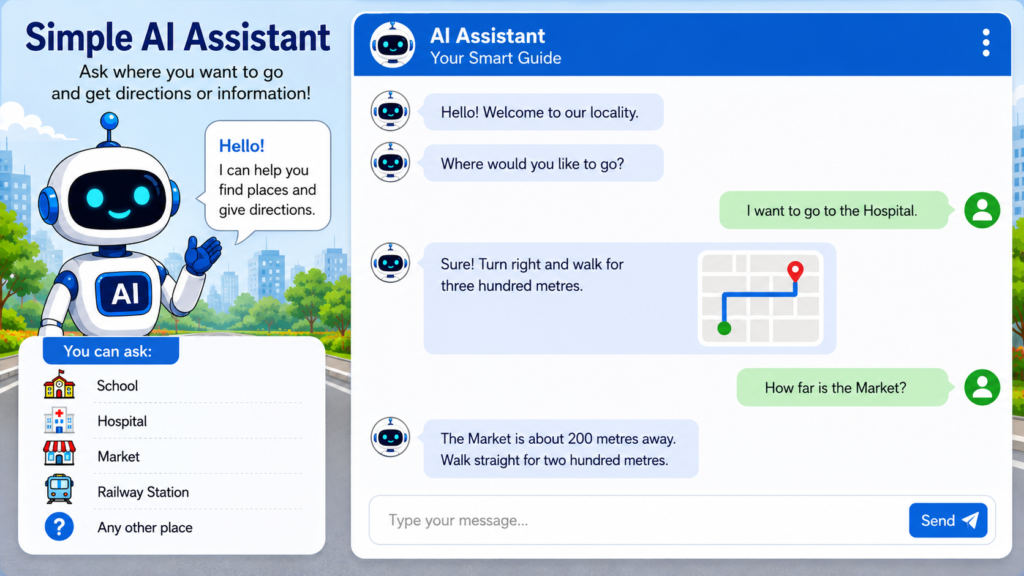
Create a Scratch project that acts as a simple AI assistant. It asks the user where they want to go and provides directions or information using questions and answers.
Algorithm
- Start.
- Display a welcome message.
- Ask the visitor where they want to go.
- Store the answer in a variable called Place.
- Check the user’s answer.
- If the answer is School, provide school directions.
- Else if the answer is Hospital, provide hospital directions.
- Else if the answer is Railway Station, provide directions.
- Else if the answer is Market, provide directions.
- Otherwise, display “Sorry, I don’t know that place.”
- Ask if the user needs more help.
- If Yes, repeat.
- Otherwise, say “Have a nice day!”
- Stop.
Variables
- Place
- Help
Scratch Blocks
when green flag clicked

say "Hello! I am your Local AI Assistant." for 2 seconds

forever

ask "Where would you like to go? (School/Hospital/Market/Railway Station)" and wait

set [Place v] to (answer)

if <(Place) = "School"> then
    say "Go straight for 500 metres and turn left." for 4 seconds

else
if <(Place) = "Hospital"> then
    say "Turn right and walk for 300 metres." for 4 seconds

else
if <(Place) = "Market"> then
    say "Walk straight for 200 metres." for 4 seconds

else
if <(Place) = "Railway Station"> then
    say "Take the first left and continue for 1 km." for 4 seconds

else
    say "Sorry, I don't know that place." for 3 seconds
end
end
end
end

ask "Do you need more help? (Yes/No)" and wait

if <(answer) = "No"> then
    say "Thank you! Have a nice day." for 3 seconds
    stop all
end
Scratch Blocks Used
You can design a simple AI assistant in Scratch by using the following blocks.
When Green Flag Clicked, Looks, Say, Sensing, Ask and Wait, Answer, VariablesSet, VariableControl, Forever, If-Else, Stop All, Operators= (Equals)
Suggested Sprites
- 🤖 Robot (AI Assistant)
- 🧍 Visitor
- 🏫 School
- 🏥 Hospital
- 🚉 Railway Station
- 🛍️ Market
Suggested Backdrops
- Local City Map
- Town Road
- Market Area
- School Campus
Extensions (AI-like Features)
You can make the assistant smarter by:
- Speaking the directions using the Text-to-Speech extension.
- Asking for the user’s preferred language (English/Hindi).
- Giving information about nearby places like parks, banks, bus stops, or restaurants.
- Showing a simple map by switching backdrops based on the selected destination.
- Playing a short welcome sound when the project starts.
with Text-to-Speech
Step 1: Add the Text-to-Speech
Extension
- Open Scratch.
- Click Extensions (bottom-left corner).
- Select Text-to-Speech.
- New blocks will appear in the purple extension category.
Step 2: Set the Voice
when green flag clicked

set voice to [ALTO v]
set language to [English (en) v]
You can also choose voices such as:
- ALTO
- TENOR
- SQUEAK
- GIANT
- KITTEN
Step 3: Welcome Message
when green flag clicked

say "Welcome! I am your AI Local Guide." for 2 seconds

speak "Welcome! I am your AI Local Guide."
Step 4: Speak Directions
School
if <(Place) = "School"> then

say "Go straight for 500 metres and turn left." for 4 seconds

speak "Go straight for five hundred metres and turn left."
Hospital
if <(Place) = "Hospital"> then

say "Turn right and walk for 300 metres."

speak "Turn right and walk for three hundred metres."
Railway Station
if <(Place) = "Railway Station"> then

say "Walk for one kilometre."

speak "Walk for one kilometre."
Market
if <(Place) = "Market"> then

say "Walk straight for 200 metres."

speak "Walk straight for two hundred metres."
Unknown Place
else

say "Sorry, I don't know that place."

speak "Sorry, I don't know that place."
Complete AI Assistant Flow
when green flag clicked

set voice to [ALTO v]
set language to [English (en) v]

speak "Hello! Welcome to our locality."

ask "Where would you like to go?" and wait

set [Place v] to (answer)

if <(Place) = "School"> then
    speak "Go straight for five hundred metres and turn left."

else if <(Place) = "Hospital"> then
    speak "Turn right and walk for three hundred metres."

else if <(Place) = "Market"> then
    speak "Walk straight for two hundred metres."

else if <(Place) = "Railway Station"> then
    speak "Take the first left and continue for one kilometre."

else
    speak "Sorry, I don't know that place."
end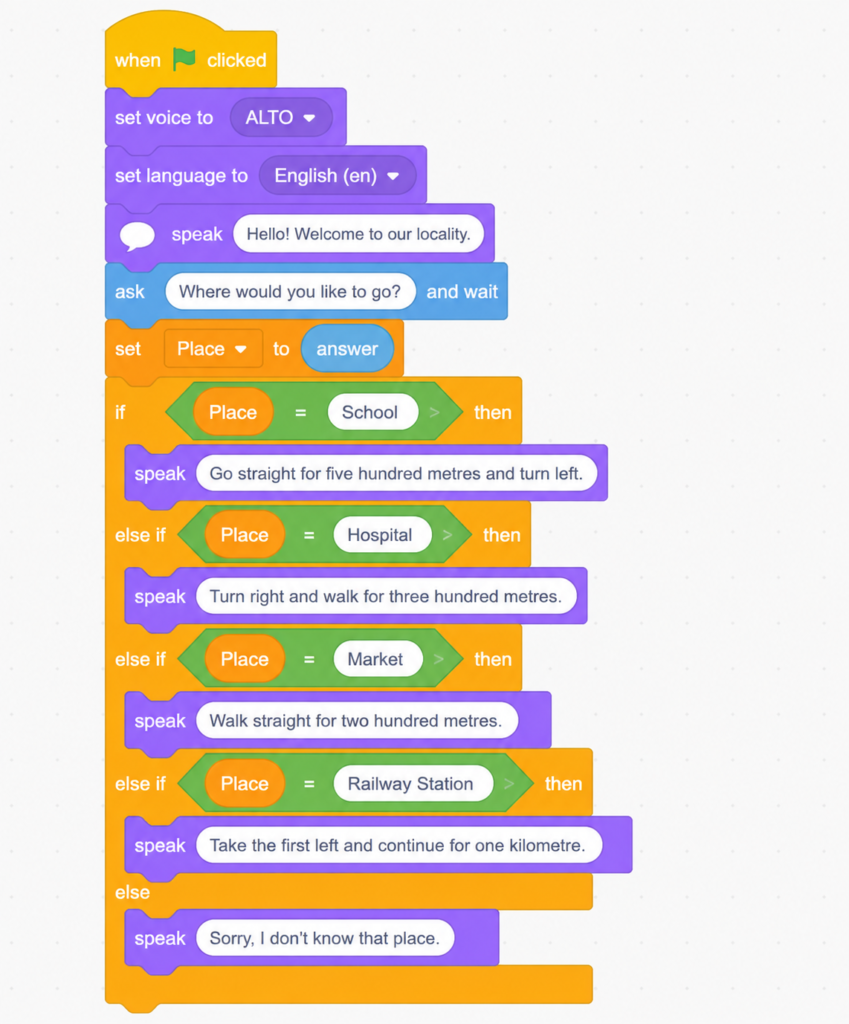
Ideas to Make It More Like an AI Assistant
- 🌍 Ask the user to choose a language (English or Hindi) and switch the spoken language.
- 🗺️ Change the backdrop to show a simple map of the selected destination.
- 🎤 Add a microphone button using the Speech-to-Text extension (available in supported versions of Scratch) so users can speak their destination.
- 🔊 Play a welcome sound before speaking.
- 😊 Add animated expressions (happy, thinking, pointing) to the robot sprite while it talks.
- 📍 Include more destinations such as the bank, bus stop, post office, park, pharmacy, and police station.